
If you are deciding between the Aqara U100 and the Aqara U300 smart lock for keyless entry that works with your phone and smart home setup, this comparison lays out the practical differences so you can match the right lock to your door and daily routine.
I installed and lived with both models on different doors to test fingerprints, codes, Apple Home Key, battery life, and how each fits into real home use.
You will leave knowing which one suits a main deadbolt entrance versus a lever-style interior or side door.
| Feature | Aqara U100 | Aqara U300 |
| Lock Type | American standard deadbolt | Lever handle / single-latch |
| Connectivity | Bluetooth + Zigbee 3.0 | Matter over Thread + Bluetooth + NFC |
| Hub Requirement | Aqara hub recommended for full remote features | Thread border router / Matter controller for full features |
| Fingerprint Capacity | Up to 50 | Up to 25–50 (handle-mounted) |
| Battery | 4x AA, up to 8 months | 4x AA, up to 10 months |
| Weather Rating | IP65 (keypad) | IPX4 |
| Unlock Methods | Fingerprint, PIN, Apple Home Key, NFC, app, key | Fingerprint, PIN, Apple Home Key, NFC, app, key |
| Best For | Exterior deadbolt doors | Lever/knob doors, offices, side entries |
| Approx. Price Range | $150–230 | $180–230 |
My Real-World Experience With Both Locks
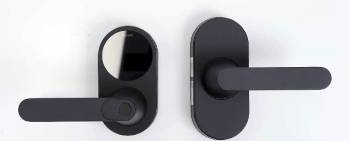
I started with the Aqara U100 on a standard exterior deadbolt door.
Installation took a bit of careful measuring for the backset and door thickness, but once the old deadbolt was out the new hardware lined up cleanly.
The fingerprint reader sat below the keypad and recognized my prints quickly after a few enrollments.
Apple Home Key worked the first time I tapped my iPhone or Watch to the lock, even when the phone battery was low.
I added temporary codes for guests and scheduled access for a cleaner.
The auto-lock feature with door sensing felt reliable once calibrated.
Battery life held strong for months with normal daily use of about eight entries.
Then I moved the U300 onto an interior office door that previously used a simple lever handle.
This lock replaces the entire lever set rather than a deadbolt, so the door preparation is different.
The fingerprint sensor lives right on the handle, which made one-handed unlocking feel natural.
I could grip the lever and authenticate at the same time.
Matter over Thread connected it to my existing Thread border router without forcing an extra Aqara hub for basic control.
Remote access and automations still benefited from a proper Matter controller.
Both locks stored credentials locally and responded fast in daily use.
The U100 felt more robust for weather-exposed doors thanks to the higher IP rating.
The U300 felt more modern and integrated for doors that never needed a full deadbolt.
From an analytical view the biggest practical split is the physical lock style.
Choose based on whether your door needs a deadbolt or a lever, then weigh connectivity and hub needs second.
Detailed Installation Walkthrough for the Aqara U100
I began by confirming the door met the thickness and backset requirements.
Most standard American doors fall inside the supported range, yet measuring twice saved time later.
I removed the existing deadbolt, keeping the strike plate if it still fit well.
The U100 package included the necessary screws, plates, and a clear diagram.
Aligning the exterior keypad and interior assembly required patience to keep everything square.
Once the spindle and mounting screws were tight, I inserted the four AA batteries and followed the app pairing steps.
Calibration of the door-open and door-closed positions made the auto-lock feature reliable.
The whole process stayed manageable for a careful DIYer with basic tools.
If your door has unusual thickness or a non-standard bore, professional help becomes the safer route.
Detailed Installation Walkthrough for the Aqara U300
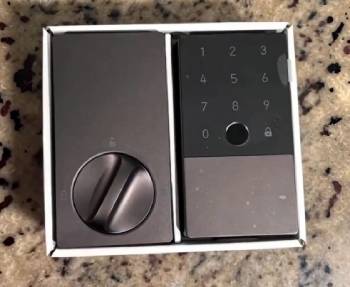
The U300 replaces a full lever or knob set rather than just a deadbolt.
I first checked that the door used a single latch and that the existing holes matched the new hardware.
Handle orientation mattered because the lock supports both left-hand and right-hand configurations.
I removed the old lever, latch, and strike, then installed the new latch and aligned the exterior and interior panels.
The fingerprint sensor sits on the handle, so correct height and grip angle affect daily comfort.
After securing the hardware I inserted the batteries and completed setup in the app.
Matter pairing required a compatible Thread border router for the full experience.
Some users report that alignment of the handle and latch takes more fine-tuning than a simple deadbolt swap.
Taking photos of the original setup before removal helped me reverse any mistakes.
Pros and Cons Of Aqara U100
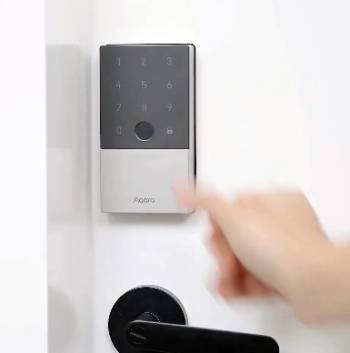
Pros Of Aqara U100
- Deadbolt Security Level: Replaces a standard American deadbolt and delivers solid mechanical security for main exterior doors.
- High Fingerprint Capacity: Stores up to 50 fingerprints with fast recognition for family members.
- Strong Weather Resistance: IP65 rating on the keypad handles rain, dust, and outdoor exposure better than many competitors.
- Apple Home Key Support: Tap an iPhone or Apple Watch to unlock even when the device has low battery.
- Multiple Access Options: Combines fingerprint, PIN codes, NFC, app control, and physical keys for flexibility.
- Long Battery Life: Four AA batteries typically last around eight months with regular daily use.
- Local Credential Storage: Fingerprints and codes stay on the device with encryption for better privacy.
- Auto-Lock and Door Sensing: Detects when the door closes and locks automatically.
- Guest and Temporary Codes: Create one-time or scheduled PINs without handing out permanent access.
- Zigbee Integration: Works deeply with other Aqara devices when paired to a compatible hub.
Cons Of Aqara U100
- Hub Needed for Full Features: Remote access, full automations, and some third-party integrations require an Aqara Zigbee hub.
- No Native Matter/Thread: Relies on Zigbee rather than the newer Matter-over-Thread standard.
- Deadbolt-Only Design: Will not fit doors that use only a lever or knob latch without a deadbolt prep.
- Bulkier Exterior Look: The keypad and reader add more visual presence than a simple lever.
- Installation Precision Required: Backset and door thickness must match supported ranges for a clean fit.
- Fingerprint Enrollment Time: Adding multiple prints takes patience for best reliability.
- No Built-in Wi-Fi: Depends on Bluetooth for direct phone control and hub for longer range.
- Battery Replacement Routine: AA cells eventually need changing even if life is long.
- Limited to Compatible Doors: Not ideal for every international or non-standard door type.
- Extra Cost for Hub: Full smart-home potential often means buying a separate hub.
Pros and Cons Of Aqara U300
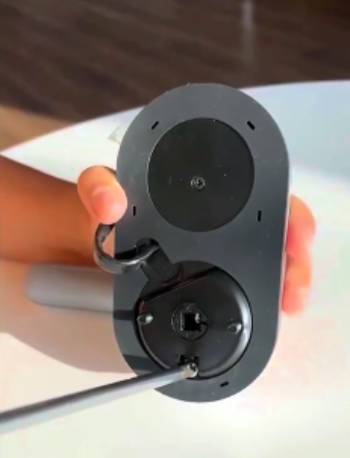
Pros Of Aqara U300
- Matter Over Thread Connectivity: Works with modern Thread border routers and Matter platforms for broader compatibility.
- Handle-Mounted Fingerprint: Sensor sits on the lever so you can unlock and open in one natural motion.
- Lever Lock Design: Ideal for single-latch doors, offices, side entries, and rooms that never used a deadbolt.
- Longer Claimed Battery Life: Up to ten months on four AA batteries under typical use.
- Apple Home Key Support: Same convenient tap-to-unlock experience with iPhone or Apple Watch.
- Multiple Unlock Methods: Fingerprint, PIN, NFC, app, Home Key, and physical key cover almost every situation.
- Passage Mode: Temporarily disable auto-lock for high-traffic periods like parties or moving day.
- USB-C Emergency Power: Dual ports in some versions let you power the lock if batteries die.
- Modern Smart Home Fit: Plays well with Apple Home, Google, Alexa, and other Matter ecosystems.
- Clean Integrated Look: Feels more like a stylish handle than a bulky smart add-on.
Cons Of Aqara U300
- Not a Deadbolt: Provides latch security rather than the higher physical security of a deadbolt.
- Lower Weather Rating: IPX4 is fine for covered areas but less robust than the U100’s IP65 for fully exposed doors.
- Door Compatibility Limits: Only fits single-latch lever or knob style doors with correct bore and thickness.
- Fingerprint Capacity Varies: Some listings show lower maximum prints than the U100.
- Still Benefits from a Controller: Full remote features and automations work best with a Thread border router or Matter hub.
- Installation Can Be Tricky: Replacing a full lever set sometimes needs more alignment work than a simple deadbolt swap.
- Newer Platform Quirks: Early Matter implementations occasionally need firmware updates for smoothest performance.
- Higher Price Point: Often costs more than the U100 for the lever form factor and Thread support.
- Not for Main High-Security Doors: Better as a secondary or interior lock than the primary exterior deadbolt.
- Physical Key Access: Keyway is present but can feel less convenient than on traditional locks.
Fingerprint Enrollment and Daily Reliability
Enrolling fingerprints on both locks follows a similar guided process in the app.
I scanned each finger multiple times from slightly different angles for best results.
The U100 reader sits on the exterior face and worked consistently once enrolled.
The U300 reader on the handle felt more natural because my thumb or finger landed on it while gripping.
Cold weather or wet hands occasionally slowed recognition on both, yet overall success rates stayed high.
I enrolled prints for every household member and kept a couple of backup codes ready.
Re-enrollment after a few months improved accuracy for fingers that had changed slightly.
Read More: Garmin HRM 200 Vs. HRM 600: Important Differences Explained
Apple Home Key Setup and Everyday Use
Both locks support Apple Home Key.
I added each lock to the Apple Home app and created keys for family members.
Tapping an iPhone or Apple Watch against the lock unlocked it quickly, even when the device showed low battery.
Express Mode made the experience almost automatic.
Sharing Home Keys through the Home app felt more convenient than managing separate codes for regular visitors.
For households already invested in Apple devices this feature alone can justify either lock.
Battery Performance and Emergency Power
Both models use four standard AA batteries.
In daily use with roughly eight to ten unlocks the U100 comfortably approached the eight-month claim.
The U300’s more efficient Thread radio helped it stretch further.
Low-battery notifications appeared in the app with enough warning to buy replacements.
When batteries eventually ran low I used the USB-C emergency port with a power bank to keep the lock working until fresh cells were installed.
Keeping a spare pack of quality alkaline batteries nearby removed any stress about unexpected power loss.
Security Architecture and Real-World Protection
Both locks store fingerprints and codes locally rather than in the cloud.
Encryption protects the data on the device.
Failed attempt lockouts temporarily disable the keypad and fingerprint reader after repeated wrong tries.
Anti-peep PIN entry lets you type extra digits before and after the real code so shoulder surfers cannot easily catch the sequence.
Mechanical keys remain available as the final fallback.
The U100’s deadbolt and higher IP rating give it stronger physical and weather resistance for primary exterior doors.
The U300 prioritizes convenience and modern networking for doors where a full deadbolt is unnecessary.
No electronic lock replaces a solid door, strong frame, and properly installed strike plate.
Those physical elements still form the foundation of security.
Smart Home Automations and Multi-User Management
With a suitable hub or border router both locks trigger useful automations.
I set the front door U100 to turn on entry lights and disarm a security mode when specific family fingerprints unlocked it.
The U300 on the office door sent a notification and adjusted the thermostat when I arrived.
Temporary and recurring codes made it easy to grant access to cleaners, dog walkers, or guests without sharing permanent credentials.
Activity logs showed who entered and when, which proved helpful for household coordination.
Passage mode on the U300 let me keep the door unlocked during high-traffic periods without disabling the entire system.
Weather and Seasonal Performance
The U100’s IP65 rating handled rain, dust, and temperature swings on an exposed exterior door without issues.
The U300’s IPX4 rating suited a covered side door and interior use.
Extreme cold slowed fingerprint reading slightly on both until hands warmed up.
Direct summer sun on the keypad never caused malfunction in my testing.
For fully exposed outdoor gates or coastal locations the U100’s tougher rating provides more confidence.
Cost of Ownership Over Several Years
The purchase price is only the start.
Add the possible cost of an Aqara hub for the U100 or a Thread border router for the U300 if you do not already own one.
AA batteries need replacement every eight to twelve months depending on use.
Neither lock requires a subscription.
Over three to five years the total cost stays reasonable compared with many Wi-Fi locks that drain batteries faster or demand cloud fees.
Choosing the lock that matches your existing smart home gear reduces extra hardware spending.
Aesthetic Fit and Interior Design Considerations
The U100 presents a more technical, keypad-forward appearance that some prefer on modern exterior doors.
The U300 looks closer to a conventional high-quality lever handle and blends more easily with interior design.
Both come in neutral finishes that suit most homes.
If visual minimalism matters on an interior door the U300 often wins.
If rugged outdoor presence matters the U100 feels more appropriate.
Who Should Choose the Aqara U100
Pick the U100 if your main entrance uses a standard deadbolt and you want strong weather resistance plus high fingerprint capacity.
It fits Apple users who already own or plan to add an Aqara hub, and anyone prioritizing a true deadbolt over a lever.
Families that need many enrolled fingerprints also benefit from the higher capacity.
Who Should Choose the Aqara U300
Choose the U300 if your door uses a lever or knob latch and you want Matter over Thread for broader future compatibility.
It works well for home offices, side doors, storage rooms, or any location where a full deadbolt is unnecessary.
Users who value one-handed operation and a cleaner handle aesthetic will prefer it.
Common Troubleshooting and Maintenance Tips
If fingerprints fail to read, re-enroll the finger with more angles and clean the sensor.
When the lock does not respond to the app, check Bluetooth range or hub connectivity and restart the lock by removing batteries briefly.
Auto-lock issues usually trace back to incomplete door-position calibration.
Keep the exterior free of dirt and the interior mechanism lightly checked during battery changes.
Firmware updates through the app improve reliability over time.
Read More: Kodak Pixpro C1 Vs. FZ55: Important Differences Explained
Comparison Against Other Popular Smart Locks
Compared with many pure Wi-Fi locks both Aqara models offer better battery life because they avoid constant Wi-Fi radios.
Against higher-priced Matter deadbolts the U100 and U300 often deliver similar core features at a lower cost.
The deciding factors remain door type compatibility and whether you already live in an Aqara, Apple, or multi-platform Matter home.
Long-Term Ownership Perspective
After months of daily use both locks continued to feel dependable.
The novelty of keyless entry faded into simple convenience.
Battery changes became routine rather than stressful.
The biggest satisfaction came from matching the correct lock style to the correct door.
A mismatched lock creates ongoing friction no feature list can overcome.
Frequently Asked Questions (FAQs)
The best depends on your door. The U100 suits deadbolt exterior doors while the U300 suits lever-style single-latch doors.
Yes. It offers reliable fingerprint, Apple Home Key, strong weather resistance, and solid battery life for deadbolt doors.
The U100 adds a fingerprint reader and generally stronger outdoor rating compared with the more basic U50 keypad model.
Basic Bluetooth and Apple Home Key work without a hub. Full remote access and deep automations benefit from an Aqara Zigbee hub.
Final Thoughts
First confirm your door type.
Deadbolt doors point strongly toward the U100.
Lever or single-latch doors point toward the U300.
Next examine your smart home ecosystem.
Heavy Aqara or Zigbee users lean toward the U100.
Users seeking native Matter and Thread flexibility lean toward the U300.
Finally weigh weather exposure and security needs.
Primary exterior doors favor the U100.
Secondary or interior doors favor the U300.